Google+
Showing posts with label Mobile. Show all posts

Sunday, January 26, 2014

Security apps for securing your accounts via mobile.

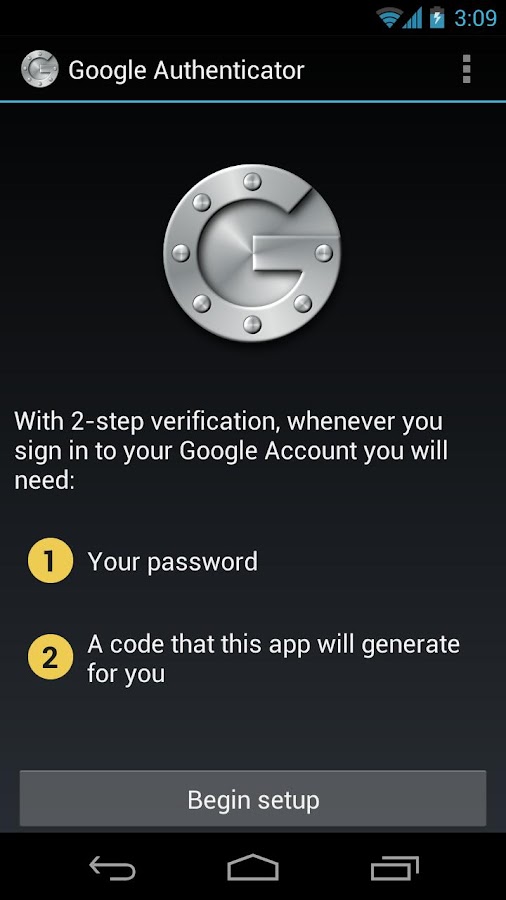
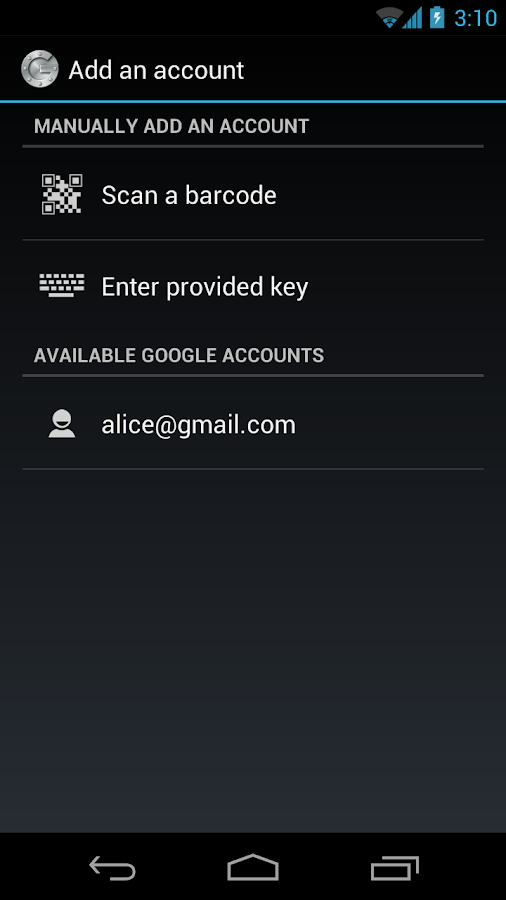
Google Authenticator:

The Google Authenticator includes implementations of one-time pass code generators for several mobile platforms, as well as a pluggable authentication module (PAM). One-time pass codes are generated using open standards developed by the Initiative for Open Authentication (OATH) (which is unrelated to OAuth). The mobile app is available for android, IOS, black berry.It allow to link multiple accounts supported by google authenticator.This provides a another security to our accounts.


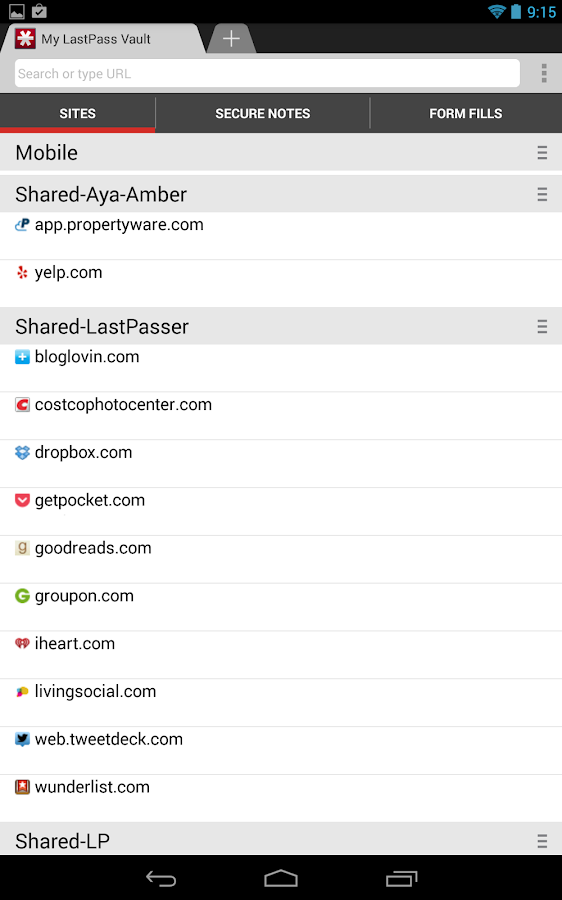
Last Pass:


Last Pass in another password Manager that is free for windows and android where as ios user has to buy it.It allow to synchronize with multiple devices and embed as a plugin in you browser.This allow you to remember only the master password and it takes care of remaining accounts. LastPass will prompt you to save your logins, generate new passwords, save Profiles for online shopping, and more. LastPass does the work for you, so logging in and checking out requires no thought.


Thursday, January 2, 2014

A Tribute to Tamil..

Many of us being a Tamilian, we had forgot how to write Tamil, though we speak in Tamil. We don’t care it to be a problem with us. We learn to speak and write in many other languages in this Tech world, but it is equally important to learn to write in our home language. Also though some of us are good at writing in Tamil, we avoid writing in Tamil on most of the cases. This being sad about us, since we fear of writing with spelling mistakes, there are many tools available to help us to write in Tamil. Most of us are not aware of such tools or we are not aware of using such tools in our daily life.

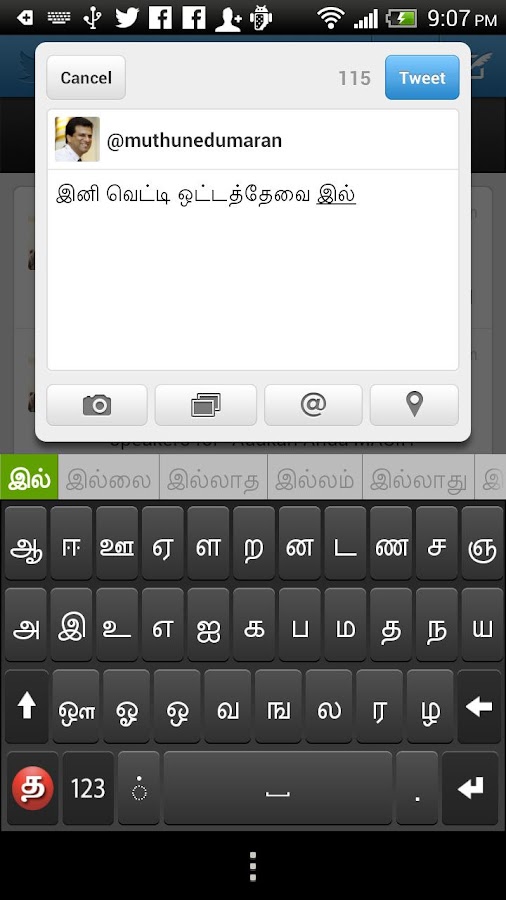
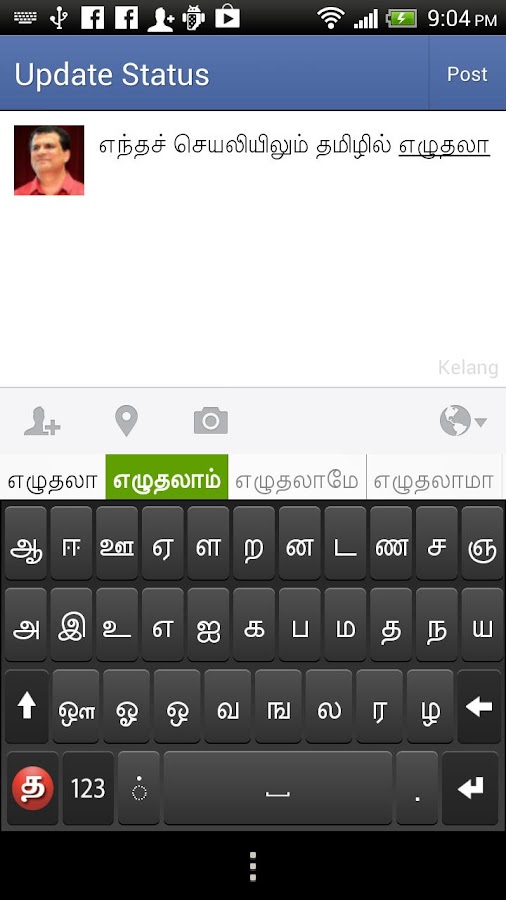
Android being a leading mobile operating system provide the support of integrating Tamil keyboard layout alongside its default keyboard by installing Sellinam Tamil keyboard (belonging to a Malaysian computing firm, Murasu Systems) to it. An upgraded version of its Tamil input tool Sellinam version 2.0 that introduces auto-correction facility has been introduced. The free Application (App) for Android mobile devices can be downloaded from the Google Play store.


Sellinam is integrated into the mobile operating system in Android and allows users to input text in Tamil in two keyboard layouts: in English (phonetic) and through a Tamil keypad. It throws up suggestions based on an internal dictionary of 1.5 lakh common words. Sellinam currently has over 1 lakh users in Android platform and in Apple’s iOS platform.

Not only android provide the support of Tamil typing even ios7 has the facility for it. Apple has introduced its two in-system Tamil keyboards in its iOS 7 mobile operating system. Even it had integrated 'Tamil 99' keyboard at system level (iMac and Mac book Air). Developer who publishes apps for mobile operating system says, this could lead to a dramatic shift in the nature of user-generated content, particularly on social networks like Face book and Twitter.


Leading mobile maker Samsung have also made a recognizable move in providing support for Tamil in its android phones along with four other Indian languages. This initiates us to type in Tamil during our chats and also helps to type in Tamil without mistakes.

Even there are applications available online for pc and laptops with UNIX or windows. Google Tamil translation software’s are bit slow but it is efficient, as it translate word by word.

For windows there is 'NHM Writer' which support typing in Tamil and it is even flexible than 

Google input tools.

Online dictionary, www.tamildict.com, is useful for finding the translation of modern technological terms such as “social network” that have become part of common use today.For Tamil input, the phonetic keyboard works well for desktops, whereas the Tamil keyboard is far superior for handheld devices.

Hope this post will be initiative for persons who want to write in Tamil and fearing of writing with spelling mistakes can avoid it and improve writing more and more.

Sunday, September 1, 2013

Samsung wave 525 tips and tricks - part 2 (Collection of large info)

Message
-Under contacts/message, swipe left to message that person-When messaging, long press the space bar to get shortcuts to punctuations(. , - ? @ !)
-When you view message, you can use multitouch feature to zoom in and out the text message -Swipe left or right to go to next or previous sms message-Tap on the name entered to get the number of that person.
-You can also type omega , dots above o stylish n and many more while typing message.To do this Goto Settings -> Applications ->messages -> Text messages -> character support. change from Automatic to " GSM alphabet ".while not using dictionary mode you can make use of this characters.

-While typing message you volume rockers to go begin or end line also to go to top of message.
Call
-Under contacts/message, swipe right to call that person
-To filter/block calls, go to call logs --> select contact --> tap on '...' --> select 'Block Contact' --> select you want to block : 'Call' or 'Message'. also you can long press the contact in call logs and select option for block contact.
-To record a call (depending on region & firmware), during an ongoing call , tap on '...' --> select 'Record Voice'. Record will be stored as .amr file in 'Sounds' folder

-Set FAKE CALL : Settings -> Applications -> call settings -> Fake call .Set the details and activate it. Press and hold the volume down key to activate Fake call,even when the key lock is enabled.

Camera
-press the camera button at the right side for quick access to camera or (camcorder)
-in camera mode, click Settings --> Tools and you can set review of photos after a shot is taken to be 'on', 'off' or review for 2 seconds
-press the volume keys to zoom in or zoom out

Internet
-when typing the URL, long press the .com to get different variants internet domains (.net, .org, .edu)

- Use volume rockers to move up /down a page.
Email
-go to Settings --> Applications --> Email --> Email accounts and select a web account to set the download limit to determine the no. of emails to download whenever you sync your web account. You can also set whether to download just the Subject or the whole email

General
-Under the App store, click on '...' --> Downloads to show a list of apps/games you have downloaded before
-You can turn on/off your keytone by pressing the volume buttons on the left side.
-Use the volume rocker (up or down) to scroll up or down long SMS/internet pages
-To take screenshots, press the menu button + lock key simultaneously
-Long press the menu button to see task manager
-Double press the menu button to access smart search function
-Under call logs/music player, long press the tabs and 2 rows of tabs will appear. rearrange the tabs to your preference and long press again to switch back to single row before closing

Music
-When in Album/Genre/Artist/ playlist, you can swipe right to play it all. E.g: When on Artist 1 playlist, you can swipe right to play all Artist 1 songs
-When in all track playlist, you can tap on the album cover to play song without exit the playlist jump to the music player
-Tap on music player while playing to get the status bar and other settings.

- check info about the song , Music recognition and find similar .when you have internet connection enabled.
-Swipe the visual image on Music player to different Visual effects.

Wednesday, March 27, 2013

Apple iPhone 5 Hammer Drop & Knife Scratch Test


Download Paid apps in Android free..

Blackmart Alpha is a Market replacement app of sorts. It seem that the main benefits of using this app are:
  • Download Paid Apps without paying
  • Cracked Apps
  • Update Non Market received Apps
  • Download Apps that are blocked on your device by Market
  • Market Does not need to be installed to use this app

There are a lot of android’s applications which downloaded in Google Play (Android Market: red). From million applications which been available in Google Play Store, not all application gives a good performance or has an optimal characteristic that are hoped by users. One of some ways to get all applications in Google Play without pay is with using Blackmart Alpha which most known as black market of Google Play Store. There are some reasons that we have to use this application. They are easy access to get free of premium application without pay first then get it, but get it and never pay. And the second is to make all unavailable application will be available.
Firstly, download blackmart-alpha.apk, then install in your android device. After installation was success, sometimes it often crash, but ignore it, because this is just a common crash and do not give a big impact to your gadget.

The second ability of Blackmart Alpha making this application become more powerful is to make some applications available in unavailable country. The applications is hidden by Google Play to certain country included Indonesia although that application is free likes Google Maps. We should not pay for this application, but we cannot find it in Google Play at all because of this application is unavailable to Indonesia.
In short, to explore more applications to your android device, use Blackmart Alpha which available making premium applications to be cost less and unhide the unavailable applications in certain country. But this application has weakness as well. We cannot use some applications in one time with this application, it often make this application be crashed. if you need free, just use it. It works…

Saturday, February 23, 2013

Protect Android Phones with Mobile Security Apps Designed To Keep Devices Safe and Protected

Protect Android Phones with Mobile Security 

Apps Designed To Keep Devices Safe and 

Protected


Mobile SecurityWith technology constantly innovating mobile phones, consumers become so dependent on these devices from the simplest tasks such as storing notes, taking photos, and sending SMS to the more complicated ones such as paying bills, syncing multi-devices, and controlling household appliances over Wi-Fi technology, it has become a necessity to keep mobile phones protected from unauthorized data access. Losing it is now one of the major threats that owners fear because of a lot of sensitive information that mobile phones are capable of storing.
Android users are in luck because there are more than enough mobile security apps available at the Google Play marketplace. If you are the type who visits the Web without worrying about the consequences it might bring to your device, then you should download one of these mobile security apps if you don’t have one yet. Hint: all of them are trusted developers in the IT industry.
  1. Lookout Mobile Security – Just like most mobile security apps, Lookout Mobile Security scans all files and apps you’ve downloaded on your Android phone. You can also log on to the website to find your phone and it will track it down, sounding off an alarm once the location has been determined. But wait, it gets even better. Anyone who tries to steal your phone and attempts to unlock your device will have his photo and location sent to your email. At $3/mo, you have the option to lock your phone and wipe or transfer the data remotely.
  2. AVG Mobile Antivirus – The mobile version of one of the world’s best free antivirus software is just as impressive as its PC counterpart. Apart from the standard features (track missing phone, scaning apps, etc.) it displays the location on Google Maps once found and wipes the device remotely. Switching between your phone’s internal memory and SD card is also possible and you can terminate apps that slow down your phone. Spend $15 more and you will have tech support to help you get through those technobabble moments.
  3. Trend Micro Mobile Security and Antivirus – The free version of this mobile security app doesn’t offer much except for the Threat Scanner, a standard in other apps that scans downloaded data against viruses. Paying $30 for the premium version may be a bit steep but parents will be more secure knowing that Parental Controls are available to protect minors from adult websites and unwanted callers can be blocked as well.
Other options that you can explore are the Avast! Free Mobile Security, Kaspersky Mobile Security, Norton Mobile Security Lite, and McAfee Antivirus and Security apps. Mobile security has never been more important than today. Losing mobile phones is now one of the major threats that owners fear because of a lot of sensitive information that mobile phones are capable of storing. Protect your Android device now and guard your phone from unauthorized access, viruses, and malware by installing these mobile security apps.

Read more at http://thedroidguy.com/2013/02/protect-android-phones-with-mobile-security-apps-designed-to-keep-devices-safe-and-protected/#kO5XXyFjpDSsfFWQ.99 

Friday, September 14, 2012

iPhone 5 review: Apple iPhone 5 hands on impressions: It doesn't look it, but it's incredible


iPhone 5 review:  Apple iPhone 5 hands on impressions: It doesn't look it, but it's incredible


                # One of the more striking things about holding a new iPhone model is how your old iPhone, which seemed perfectly sleek and adequate just an hour earlier, can suddenly feel slow, clunky and heavy. It's a neat trick, one that Apple is betting on to help it ship new units to exsisting iPhone owners in the coming year.
              # After the Apple press event, we were given some hands-on time with the upgraded iPhone 5, as well as the iPod touch and iPod nano. Here are our first impressions of the taller, lighter iPhone 5, which we tested next to a crusty, pratically fossilied iPhone 4.
            # The iPhones and iPods were laid out on tables in the dim, windowless hall at the Yerba Buena Center for the Arts. Protective Apple employees made sure the devices weren't pilfered, wiped off journalists' finger prints and visibly flinched every time someone dropped a phone (which happened quite a few times while we were there).
                From the front, the iPhone 5 looks just like the iPhone 4 and 4S. It actually takes a moment to register that it's taller (holding it next to a previous iPhone model helps bring it home). The display is the same retina display found in the iPhone 4, iPhone 4S and now, the new iPod Touch, but is now 4-inches instead of 3.5-inches.


                  Then you pick it up. The phone is incredibly light, and that weight is its most striking and memorable feature. It feels almost delicate in the hand, naked without some sort of protective case to prevent it from snapping in half. Of course, the iPhone is not nearly that fragile. The body is made out of the same aluminum found in MacBooks, as well as glass. It feels expensive, not like a plastic device that could break easily. (We look forward to the inevitable drop tests.)
                # On their own, thinner and lighter are interesting selling points. Yes, it feels incredible in the hand, but the iPhone 4 wasn't exactly weighing anyone down, and consumers weren't clamoring for a thinner smartphone. On the other hand, Apple prides itself on delivering features people will want before they know they want them. There has been demand for more screen real estate, and on that front the iPhone 5 delivers, but it might still not be enough for those hoping for a 4.5-inch screen like what's found on many Android devices.
                # The new iPhone has a faster, A6 processor. It did feel zippy as we flipped through the new Passbook feature, watched movies and scrolled through websites, however these tasks weren't exactly lagging on the iPhone 4. Games were a great place to see the processor in action, where detailed graphics are rendered incredibly fast.
                # Also noticeably speedy was the new panorama feature in the camera app, which processed a 360-degree image of the room almost instantly. For many similar third-party apps, there's a short wait time while the images are stitched together.
                      
http://images.apple.com/iphone/home/images/gallery_wireless.jpg

                        #   The demo devices were all running the new version of Apple's mobile operating system, iOS 6, which has Apple's first Google-free maps app. The Flyover feature turns cities into interactive, 3D images. You can drag a finger to spin around a skyscraper and zoom in and out of the city from any angle, not just the straight down satellite view.          There is a bit of lag on the loading time when you move to a new area, but somehow the features still feels shockingly fast. Flyover is more fun than functional, but perhaps the stunning graphics and turn-by-turn directions will distract consumers from what's newly missing from the Maps app, like the very useful public transit directions feature.
                         # The room was too loud to test out the Siri voice assistant, which has turned to third-party services to improve results. Restaurant results are now powered by Open Table, movie times and reviews by Rotten Tomatoes. It has also added Facebook integration. And the devices were all connected to WiFi, so tests of the new LTE cellular connections will have to wait until we have devices in hand.
                           # We also spent a bit of time with the iPod touch. The iPod touch is like the iPhone's kid brother, always inheriting old clothes and toys. It has the 5 megapixel camera from the last version of the iPhone, as well as the A5 processor. It finally got a Retina display, Siri and front-facing camera. But this time the iPod touch got two of the iPhone's most stunning new features at the same time: The taller screen and crazy thin and light body (the iPod touch is actually .06-inches thinner and weighs 0.85 ounces less than the iPhone 5).
                            # During the hands-on time, Apple executives milled about the room, including smiling CEO Tim Cook, who was shaking hands and giving a lot of hugs. He had good reason to be happy; the phone appears to be top-notch, its new body an impressive feat of engineering. It may not be the most mind-blowing upgrade, but that doesn't diminish its level of quality.